Birthday Party Photo Sharing: How to Collect Every Guest's Photos
No photographer at a birthday means the photos live on guests' phones. A host's guide to collecting all of them with one QR code — signs, wording, timing.

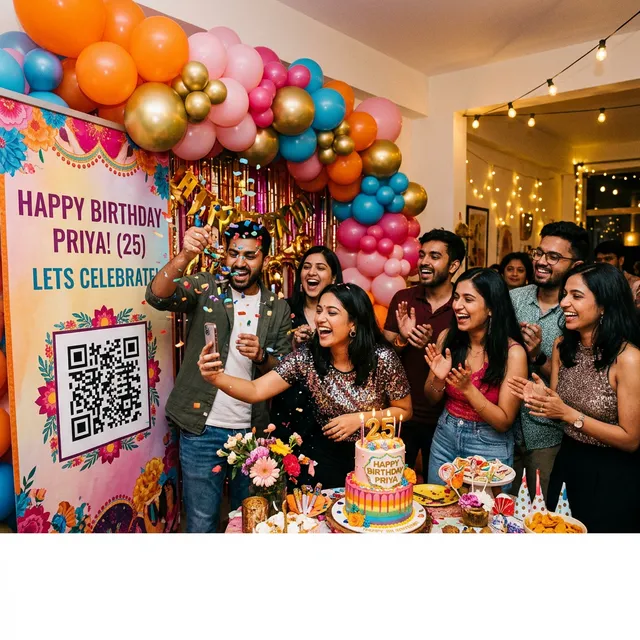
A birthday party almost never has a photographer. The cake, the candles, the reaction to the surprise, the group shot at midnight: every one of those moments is on a guest's phone, and most of them will stay there. This guide is about getting them off those phones and into one place, with as little asking as possible. It is written for the host of a birthday of any size, from a first birthday with twelve parents in a living room to a fortieth with a hundred people and a DJ.
We build EventPixel, a birthday photo sharing app, so we have an interest here. Everything below works with any QR-code photo collection tool, and the parts that are specific to ours say so.
Why birthday photos go missing
Three things make birthdays worse than weddings for collecting photos, even though the parties are smaller.
Nobody is in charge of photos. At a wedding there is a photographer and usually a planner. At a birthday, the host is also the bartender, the DJ and the person cutting the cake. Photo collection has to run itself.
The guest list is mixed. A birthday brings together the work friends, the school friends, the cousins and the neighbours. They are not in one group chat, so there is no single place to post "send me your photos". Half of the people with the best shots are people the host does not have a number for.
The photos are candid, which means they are scattered. There is no posed formation and no "everyone by the cake" moment that one camera can capture. The best photo of the birthday person is usually taken by whoever happened to be standing opposite them when they laughed, and that is a different guest every time.
The result is predictable. A week later the host has four compressed photos in a WhatsApp thread, a promise from a cousin to "send the rest", and nothing from the twenty other people who took pictures.
What a QR code changes
A QR code for photos is a printed sign that opens an upload page when a guest points their phone camera at it. The guest taps Upload, picks photos from their camera roll, and they land in a gallery the host controls. There is no app to install, no account to create and no group to join. That last part is what matters at a birthday: the plus-one nobody has a number for can still contribute, and the grandparent who will never join a group chat can too.
The other change is timing. Guests upload on the night, while the phone is already in their hand, rather than three weeks later when someone remembers to ask. Uploads arrive during the party and in the day or two after, when people go through their camera rolls; almost nothing arrives later. Collect early or not at all.
Setting up before the party
1. Create the event when you send the invitations
Do this weeks ahead, not the morning of. On EventPixel the upload window and storage are counted from the party date you choose, not from the day you sign up, so there is no cost to setting it up early. Name the event the way guests will recognise it ("Priya's 30th"), set the date, and pick a design. There are seven birthday designs; the free plan gives you the starter one and any paid plan unlocks all of them.
The event page is also a small birthday website: the schedule, the address, an RSVP form and the gallery all sit behind the same link. If you put that link on the invitation, guests already have the upload page in their pocket before they arrive.
2. Print the QR code
Every EventPixel event comes with free print-ready QR signs in the event's design. Using another service? The free QR code and sign generator takes any link. Download the PDF, print at home or at any print shop. You need three copies, not one:
- At the door. A welcome sign is the one thing every guest walks past. Most will not scan it there, but they will know the code exists.
- By the cake. Every phone comes out for the candles. A code within arm's reach of the cake table gets the most uploads of the night.
- By the drinks or the food. People queue there, and people who are queuing scan things.
For a seated dinner, table tents work better than a single sign. For a kids' party, put one sign at the entrance addressed to parents, because the parents are the ones taking photos, and a second by the cake. The printable templates page has table tents, A4 signs and small cards.
3. Send the link the day before
Post the link in whatever group chats exist, with one line: "If you take photos tomorrow, add them here, no app needed." Guests who open it early upload the getting-ready and on-the-way photos, and those are often the best of the set. It also means the gallery is not empty when the first person scans the sign at the party.
4. Upload ten photos yourself
An empty gallery gets ignored. A gallery with ten photos of the decorations and the cake gets copied. Upload them before anyone arrives.
During the party
Run the live wall
If there is a TV or a projector in the room, open the gallery's photo wall link on it. It runs as a slideshow that updates as guests upload, with the QR code kept on screen. This is the single most effective thing you can do for upload numbers: people see their photo appear on the wall and want to add another, and people who had not scanned see the code and do. Any laptop with an HDMI cable works, as does a smart TV browser, a Chromecast, an Apple TV or a Fire TV Stick. The connect your TV page walks through each one.
Make one announcement
Just before the cake, say one sentence: "If you have taken photos tonight, scan the code by the cake and they go straight to [name]. No app, takes ten seconds." One announcement, zero pressure. Do not repeat it; the wall does the reminding.
Keep an eye on the gallery
Photos appear the moment they are uploaded; there is no approval queue. For a party where that matters, keep the gallery open on a laptop and delete anything you would rather not have on the wall within seconds of it appearing. For an eighteenth or a twenty-first, that is usually a job for a friend who is not drinking.
The morning after
Post the link once more with a thank-you. This one message brings in the photos people meant to send on the night and forgot. Leave it at that; a third ask gets nothing.
Then, a few days later:
- Download everything. One click in the dashboard gives you a ZIP of every photo at original quality. Do this even if the gallery stays online, because a copy on your own drive is the copy that survives.
- Let guests find their own photos. With PixelFind, each guest takes a selfie in the gallery and gets every photo they appear in, so nobody scrolls through 800 photos looking for the ones with their family. On the Free and Classic plans the host can preview it; from the Premier plan every guest can use it. The selfie is used once and discarded.
- Pick thirty. A birthday gallery of 600 photos gets looked at once. Thirty favourites in a shared album or a printed book get looked at for years.
Advice by kind of birthday
Kids' parties. The gallery is private to the link, nothing is posted to social media, and you decide whether other parents can download. That makes it the safest way to collect photos of children from other families; the WhatsApp alternative puts every child's photo on every parent's phone with no control at all.
First birthdays. The birthday person will not remember any of it, so the photos are the whole point. Set it up with the invitations, and send the link to the grandparents who cannot attend; they can watch the gallery fill up on the day.
Quinceañeras and sweet sixteens. A court, a mass, a reception, a hundred guests: this is the one birthday that behaves like a wedding. Put the code on the invitations and on every table, and turn on face search so each family can find its own photos.
Eighteenths and twenty-firsts. Keep a sober friend on the laptop. Add a password to the gallery so only guests get in.
Thirtieths, fortieths and fiftieths. These bring together people who have not been in the same room for years, so the group photos matter most. Table tents plus the wall; face search afterwards so everyone gets their own set.
Surprise parties. Send the link to the guests and not to the birthday person. The guests upload the setup and the moment the door opens, and the gallery becomes the record of the surprise itself. Keep the QR code off the wall until the reveal.
What it costs
On EventPixel the free plan covers the event page, the QR code, the live wall and 100 guest uploads, with the upload window open for 30 days after the party. For a dinner of twenty or a small kids' party that is usually the whole night. If the gallery fills up, a one-time payment for that event removes the cap; there is no subscription and nothing renews. The current prices in your currency are on the birthday photo sharing page. One honest limitation: EventPixel collects photos, not videos.
Common mistakes
- One sign, at the door. Nobody scans on the way in. Put the code where phones are already out: the cake and the bar.
- Setting it up on the day. The link should be on the invitation or in the chat the day before, so the first uploads arrive before the party starts.
- Asking three times. One announcement at the party, one message the morning after. More than that and people tune out.
- Never downloading. Galleries expire on every platform eventually. Download the ZIP within the week.
- Using the birthday page for an office party. Same tool, different page. The party photo sharing app guide covers house parties, office parties and reunions, where the placement advice is different.
A birthday happens once. The photos your guests take are the closest thing to a record of it you will ever have, but only if you collect them on the night. Set up the event when you send the invitations, print three signs, run the wall, and post the link once the next morning. That is the whole system.






